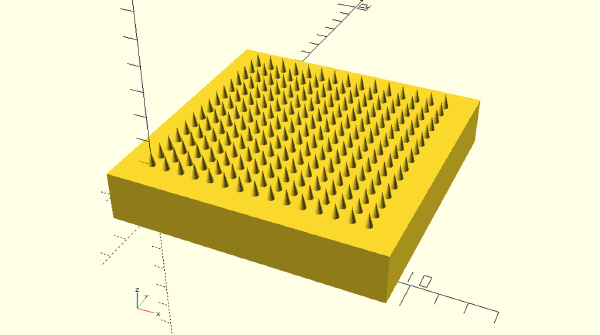
The same 15×15 microneedle array, generated four ways in code. The interesting part isn’t the loops — it’s that three of the four scripts refuse to merge the 225 cones into the baseplate at all, and hand that job to the slicer instead.
Everything I learned taking a research tool from a messy script to a licensed, permanently-archived, citable release with a DOI — the concepts, every option, and exactly when and why to use each.
صفحة مرجعية تقسم الموضوع لمسارين واضحين: استخراج الإيميل الجامعي، ثم الفوائد والقيود مع مصادر رسمية.

Markdown‑First Workflow (for Engineers) # This is a professional, Markdown‑first authoring workflow for technical documentation, lectures, blogs, and slides.
All content is written in Markdown, and outputs (PDF, HTML, slides, static site) are generated automatically.
1. Core tools # VS Code – main editor. Markdown – single source format for docs, lectures, blog posts. LaTeX – inline and block math inside Markdown. Mermaid – diagrams inside code blocks. Marp – Markdown‑based slides. Hugo – static site generator for SEO‑friendly blog / docs. Pandoc + markdown-pdf – PDF / HTML / DOCX generation from Markdown. 2. Writing layer (what you type) # All content is written in Markdown:
$$ \ddot{x} + 2\zeta\omega_n\dot{x} + \omega_n^2 x = 0 $$ \(\ddot{x} + 2\zeta\omega_n\dot{x} + \omega_n^2 x = 0\)
Diagrams:
graph LR A[FIXED] --> B[Mermaid Works] graph LR A[FIXED] --> B[Mermaid Works] Slides (Marp):
--- marp: true theme: default paginate: true math: mathjax --- # Lecture 1 – Introduction to Robotics 3. Editor setup (VS Code) # Install these (or similar):

Comprehensive ESP32 Arduino Core Installation Guide # Overview: Two Installation Methods # Method Best For Pros Cons Boards Manager Beginners, stability One-click install, version management, automatic updates Slight delay for newest features Manual/Git Clone Developers, beta testers Latest commits, instant updates, offline capable Manual updates, potential instability Method 1: Boards Manager (Recommended for Most Users) # Universal Prerequisites # Arduino IDE 1.8.19+ or Arduino IDE 2.3+ (IDE 2.x recommended) Python 3.7+ (usually bundled with IDE 2.x) USB Cable: Must be data-capable, not charge-only Step 1: Add ESP32 Board Manager URL # Arduino IDE 2.x:
File → Preferences (or Ctrl+,) In “Additional boards manager URLs” add: https://raw.githubusercontent.com/espressif/arduino-esp32/gh-pages/package_esp32_index.json Click OK Arduino IDE 1.8.x:
File → Preferences Same URL as above If multiple URLs, separate with commas Step 2: Install the Core # Tools → Board → Boards Manager… Search for “ESP32” by Espressif Systems Select version (latest stable recommended, e.g., 3.0.x or 2.0.x) Click Install (downloads ~500MB-1GB of toolchains) Step 3: Select Your Board # Tools → Board → ESP32 Arduino → Select your specific board:

Comprehensive Dual-Boot System Recovery & Maintenance Guide # Arch Linux & Windows 11 UEFI Systems # 1. System Architecture & Failure Modes # 1.1 UEFI Boot Mechanics # Modern dual-boot systems rely on UEFI NVRAM (Non-Volatile Random Access Memory) to store boot entries. Unlike Legacy BIOS (MBR), UEFI maintains a database of bootloaders independent of disk order. Common failure modes include:
NVRAM Wipe: BIOS reset, SSD removal/reinstallation, or CMOS battery loss clears boot entries EFI Partition Misalignment: Moving/resizing partitions changes start sectors, breaking GRUB’s file references Filesystem Locks: Windows Fast Startup/hibernation marks NTFS as dirty, preventing Linux write access Kernel Absence: Incomplete mounts or partition moves resulting in missing /boot/vmlinuz-linux 1.2 Pre-Recovery Data Collection # Before manipulation, capture system state:
# Boot from Arch Live ISO sudo fdisk -l /dev/sda # Partition table geometry sudo lsblk -f # Filesystem types and UUIDs sudo blkid # Detailed partition attributes efibootmgr -v # Current UEFI boot entries (if available) 2. Bootloader Recovery & GRUB Restoration # 2.1 Scenario A: Lost Boot Entries (Post-BIOS Reset) # Symptoms: System boots directly to Windows; no GRUB menu; missing Linux entry in firmware boot menu.